I’ve tracked over 90 projects through synthesis engineering, with about 45 currently active. Each one has a CONTEXT.md file (working memory), a REFERENCE.md file (stable facts), and an entry in a YAML index with status, tags, dates, and relationships. There are 200+ lessons learned files. Daily action plans. Session archives going back months.
All of this lives on my filesystem as markdown and YAML. It works. The conventions are solid, the data model has survived real daily use. But browsing it means asking Claude Code to read index.yaml and parse the results, or opening raw files in a text editor and scanning headings. The information is there. The interface is ls and grep.
I wanted a console for all of it. So I built one.
What it does
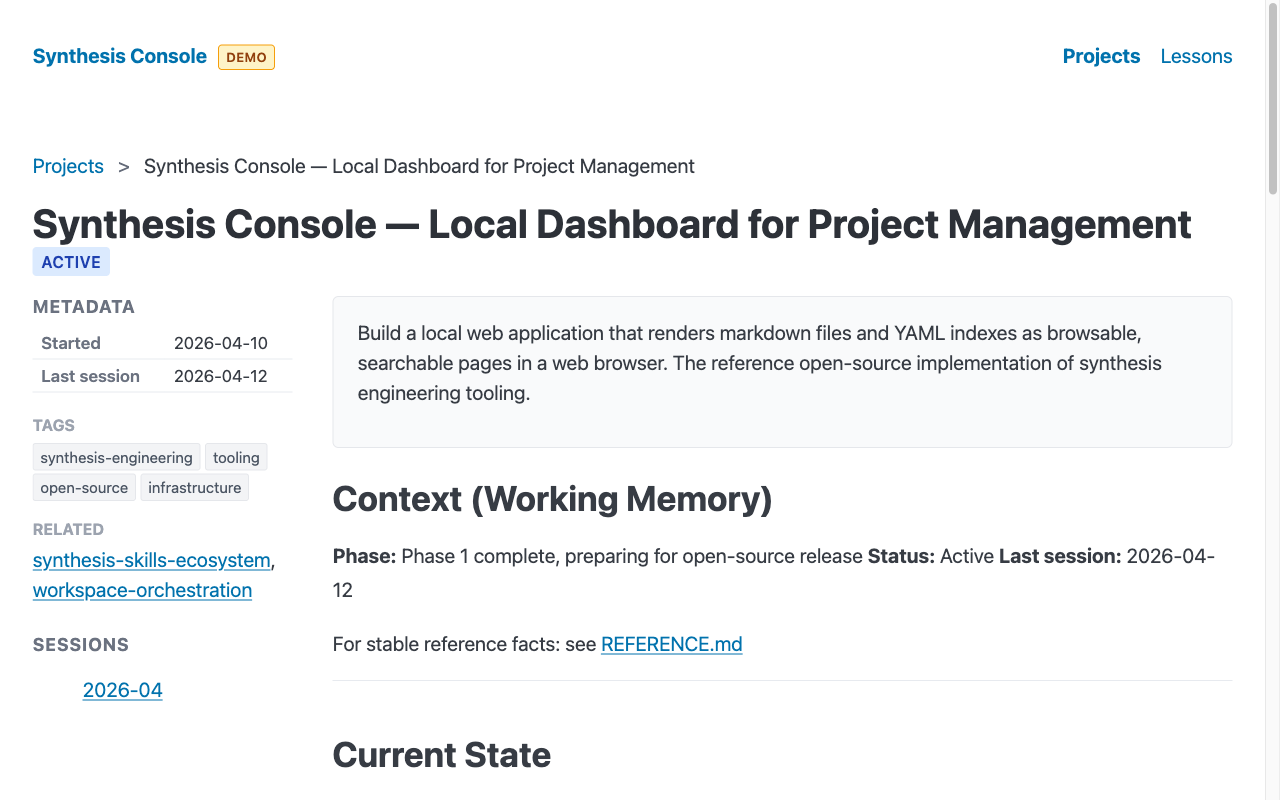
Synthesis Console is a local web server that reads your project management files from disk and renders them as browsable pages in a web browser. Project list with color-coded status badges. Search across names, descriptions, and tags. Filter by status or tag. Click into a project to see its CONTEXT.md and REFERENCE.md rendered as HTML with a metadata sidebar. Browse lessons learned in a date-sorted table.
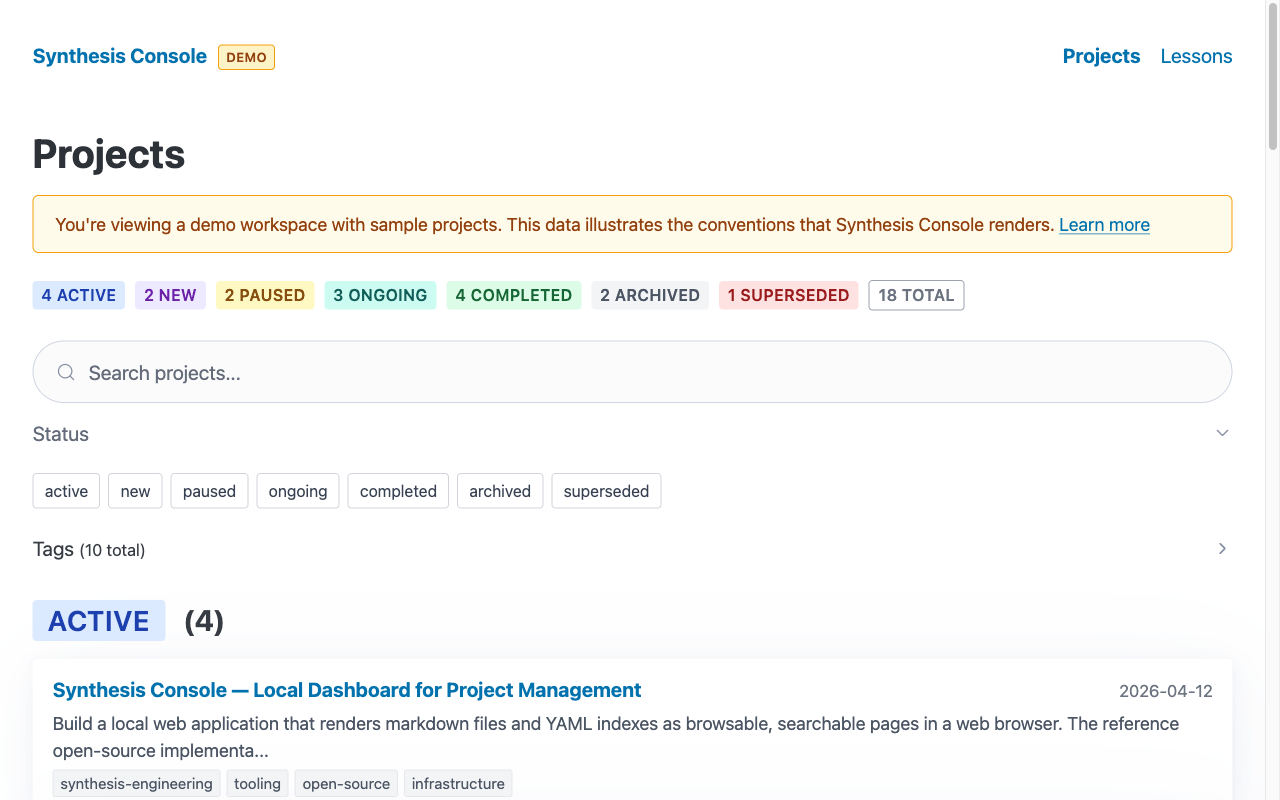
It reads from disk on every request. Edit a markdown file, refresh the browser, see the change. No database, no import step, no sync. The files are the source of truth.
The thinking that shaped it
Before writing code, I applied the synthesis thinking framework to make architecture decisions. Two of the five modes were particularly useful here.
First principles stripped away assumptions. What’s actually true? The data is markdown and YAML on a local filesystem. The dataset is small — about a hundred projects, a couple hundred lessons. There’s no need for a database. There’s no need for a build step. The tool reads and renders; Claude Code writes. Clean separation.
Analogical thinking shaped the architecture by testing frames from other domains.
My first instinct was “Grafana for project management” — configurable views over structured data. But Grafana implies real-time metrics, time-series queries, database backends. Wrong frame. These are documents, not metrics.
The better analogy turned out to be Obsidian for structured project data. Local-first. Reads files from disk. Renders markdown. No cloud dependency. But more opinionated than Obsidian — it understands project status, relationships, and timelines because it knows the conventions.
What Jira is to Scrum, synthesis-console is to synthesis engineering. One open-source implementation of the tooling layer for a methodology. Others can build their own.
Three dependencies
The entire tool has three runtime packages: Hono for HTTP routing, js-yaml for parsing the project index, and marked for rendering markdown. Plus Bun as the runtime.
This was a deliberate constraint, not an accident. Every dependency is an attack surface, a maintenance burden, and a compatibility risk. I’ve worked on projects that accumulated 40+ direct dependencies over a couple of years. Security audits become a recurring tax. Abandoned packages require emergency replacements.
When synthesis coding makes it cheap to build things yourself, the calculus shifts. The dependency budget was set before the first line of code.
Server-side rendering with template literals eliminates the need for React or Vue. A classless CSS framework (Pico CSS via CDN) eliminates the need for a CSS build pipeline.
Hono deserves a specific mention: it runs on Bun, Node.js, and Deno. If someone prefers Node, the same code runs there. That’s the portability insurance built into the dependency choice.
How the conventions work
The console doesn’t impose a data model. It renders files that follow synthesis project management conventions:
- index.yaml — the master project index. Each project has an ID, name, status (
active,paused,completed,archived, etc.), description, tags, dates, and related project IDs. - CONTEXT.md — working memory for a project. Current state, recent decisions, next steps. Budget: 150 lines.
- REFERENCE.md — stable facts. Architecture, URLs, team contacts. Updated in place.
- sessions/YYYY-MM.md — session archives. Append-only monthly files.
- lessons/YYYY-MM-DD-slug.md — cross-project lessons learned (top-level peer to
projects/).
The tool depends on the methodology, not on the agent. Someone using these conventions without Claude Code or any AI agent can still use the console.
Configuration that travels
I work across two Macs with different usernames. The config file uses ~/ paths:
# ~/.synthesis/console.yaml
workspaces:
  - name: personal
    root: ~/workspaces/personal
    knowledge: ai-knowledge-personal
port: 5555
Same file, works on both machines. If no config file exists, the console auto-detects workspaces by scanning for directories matching ai-knowledge-*. If nothing is found, it falls back to a built-in demo mode with sample data — which is also how new users evaluate the tool without setting up a workspace first.
The default port is 5555. If it’s busy, the server automatically finds the next available port and tells you. The same pattern Vite and Astro use.
Daily plans: one person, one plan
The console also renders daily action plans — task lists, draft messages, delegation tracking, bug tables. The design decision here is worth calling out: daily plans are person-scoped, not workspace-scoped. You are one person across all your roles. Your daily plan covers everything you’re doing today, whether it’s for your employer, your advisory work, or your personal projects.
This follows the identity model that GitHub got right: one account, multiple organizations. Not the Gmail model of fragmented identities across separate accounts. Your plan lives in your personal workspace. The workspace selector switches project context, not your identity.
Draft messages in the plan come with grounding — the specific code commits, test results, Slack threads, and project context that informed each draft. A notice reminds you to review and personalize before sending. The tool does the research; you add the judgment and voice.
Synthesis engineering as a discipline
The console exists because synthesis engineering produces enough structured documentation to need its own tooling. That’s the discipline working as intended.
When you manage projects through CONTEXT.md files with a 150-line budget and archive older content to session files, when lessons learned are dated markdown files with clear structure, when project state is a YAML index with seven status values and a tag taxonomy — you have a data model. The console is the view layer for that data model.
I see synthesis engineering becoming a recognized discipline — the way agile, Scrum, and DevOps became disciplines with their own methodologies, conventions, and tooling ecosystems.
Synthesis-console is one open-source implementation of the tooling layer. The synthesis skills define the methodology — project management, context lifecycle, daily planning, code review, and more. The console renders the artifacts those skills produce. Together they form a complete system. Install the skills, follow the conventions, use the console to see the results.
Others can build their own implementations — open source or commercial — following the same conventions or inventing better ones.
The code is at github.com/rajivpant/synthesis-console. Apache 2.0 license. Try bun run demo to see it with sample data before pointing it at your own workspace.
Updated 2026-04-21: Added optional install scripts to auto-start the console on login — macOS via a launchd LaunchAgent, Linux via a systemd user unit. Per-user, no root. Run bun run autostart:install to set up, bun run autostart:uninstall to remove. See the README section on auto-start for details.